
How to Keep Your Seafarer Profile Up to Date on the DGS Portal — A Complete Step-by-Step Guide
 Akshay Shrivastava
07 May 2026
5512 view
0
0 Comment
If you are an Indian seafarer, your profile on the Directorate General of Shipping (DGS) portal is one of the most important documents you maintain arguably as critical as your CDC or CoC. Yet, it is one of the most commonly neglected tasks. Outdated contact details, an expired passport not uploaded, or a forgotten password can create real-world delays when you are trying to apply for a new Certificate of Competency, renew your SID, or even get your next contract.
In this guide, we walk you through step by step exactly how to change your DGS profile password and how to update your seafarer profile on the DGS e-governance portal. Whether you are sailing or on vacation, this is something you can and should do yourself.
Why Keeping Your DGS Seafarer Profile Updated Matters
Before we get into the how, let us quickly address the why.
Your DGS seafarer profile on the e-governance portal (accessed via dgshipping.gov.in) is the official record that the Directorate General of Shipping, India maintains for every registered seafarer. It contains your personal details, address, physical attributes, educational qualifications, professional training details, certificates, sea service records, and authorised documents like your passport.
When any of these details are outdated or incorrect, it creates mismatches during document verification, CoC applications, or port state control inspections. It can also lead to delays in getting your SID issued or renewed.
The bottom line: your DGS profile is your maritime identity in India keep it current.
Part 1: How to Change Your DGS Profile Password
If you are logging in for the first time, or if you have forgotten your password, here is how to reset and change it.
Step 1 - Go to the DGS Website
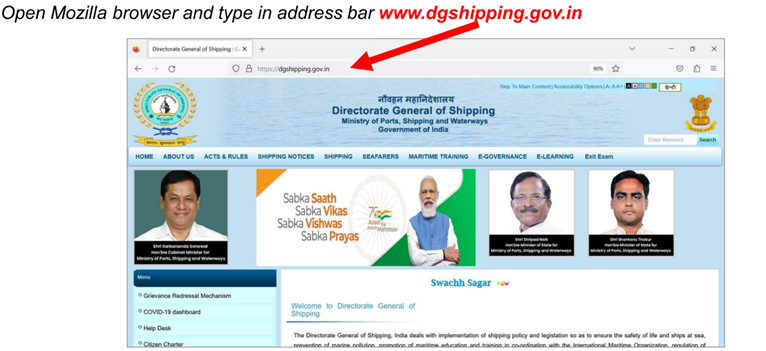
Open Mozilla Firefox (recommended) and navigate to www.dgshipping.gov.in. It is worth noting that the DGS e-governance portal works best on Mozilla Firefox or an older version of Internet Explorer — avoid Chrome for this.
Step 2 - Navigate to E-Governance
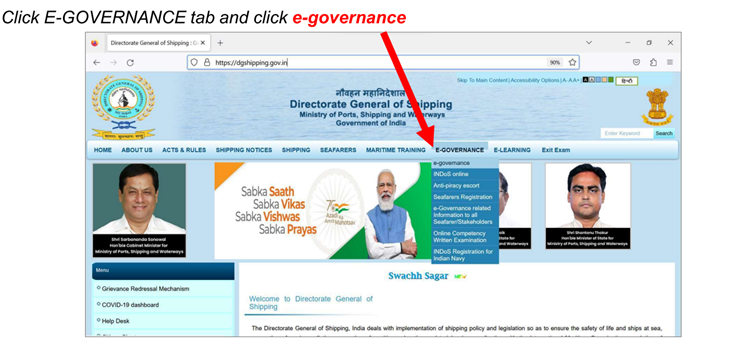
On the homepage, click on the E-GOVERNANCE tab in the top navigation bar. A dropdown will appear. Click on e-governance from the dropdown menu. This will take you to the DGS Esamudra portal.
Step 3 - Log In with Your INDoS Number
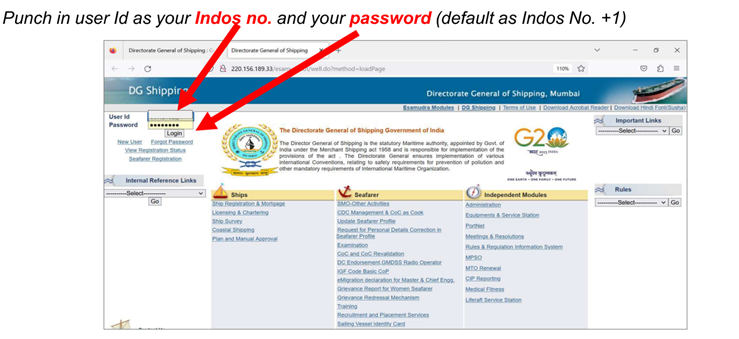
On the login page, enter your INDoS number as your User ID. Your default password is your INDoS number + 1 (i.e., if your INDoS is 1234567, your default password is 1234568). If you have logged in before and changed it, use your existing password.
Step 4 - Click Reset Password
Once logged in, you will see your name on the top left and a "Reset Password" link just below it. Click on it.
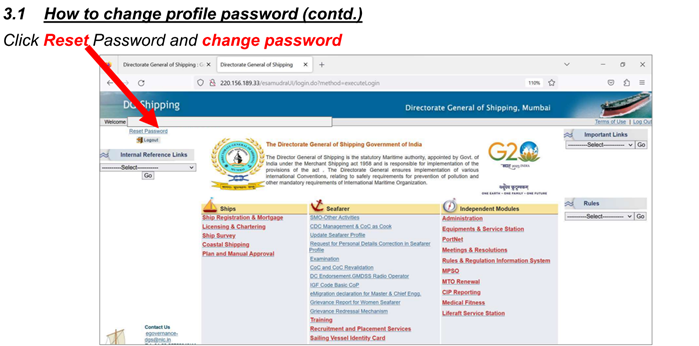
Step 5 - Fill in the Change Password Form
You will be taken to a Change Password screen. Enter the following:
- User ID - your INDos number
- Old Password - your current password
- New Password - minimum 6 characters
- Confirm New Password - re-enter the new password
Click Submit. Your password is now updated. Keep it somewhere secure.
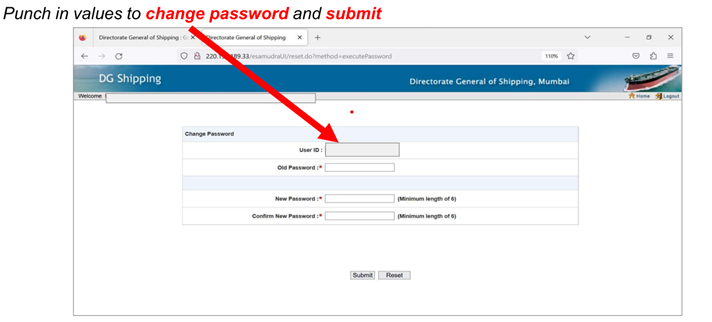
Part 2: How to Update Your Seafarer Profile on the DGS Portal
Updating your profile follows a similar login process, with a few extra steps.
Step 1 - Access the DGS Portal
Open Mozilla Firefox and go to www.dgshipping.gov.in. Click on E-GOVERNANCE → e-governance from the top menu. This takes you to the Esamudra login page.
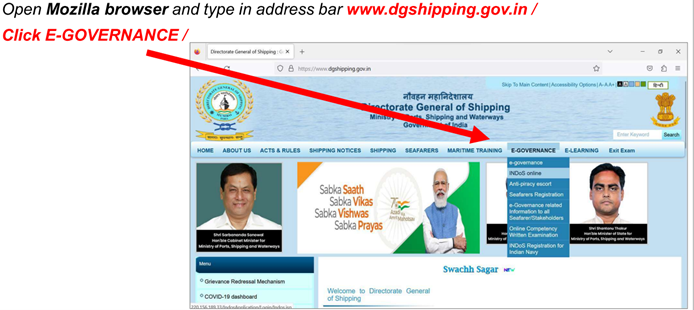
Step 2 - Log In
Enter your INDoS number as User ID and your password. Click Login.
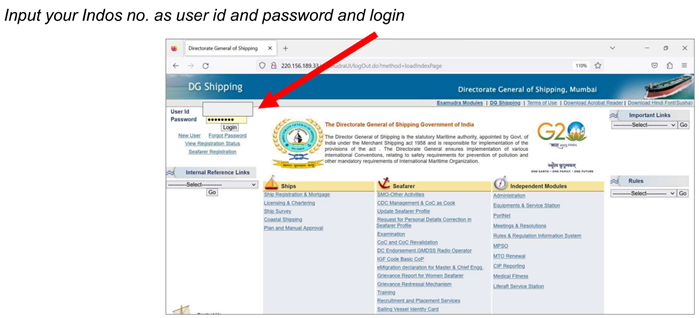
Step 3 - Go to “Update Seafarer Profile”
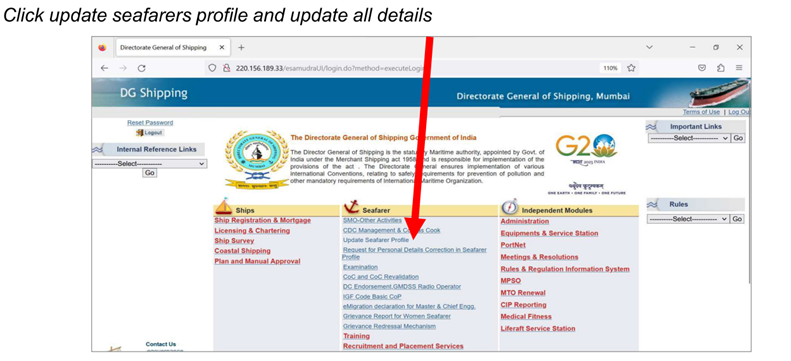
Once inside the portal, under the Seafarer section in the middle of the screen, you will see a link called "Update Seafarer Profile". Click on it.
Step 4 - Update Your Personal, Address and Physical Details
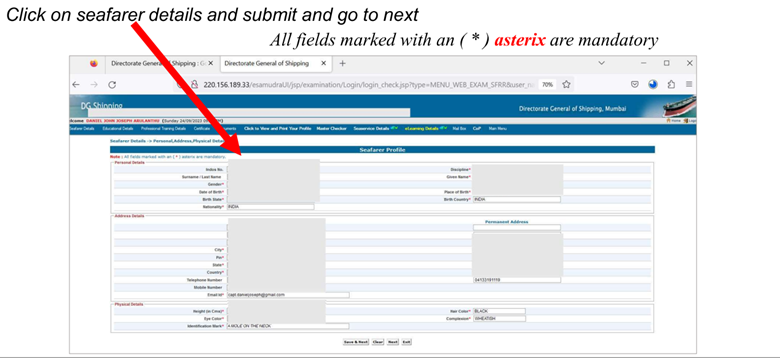
You will now see the Seafarer Profile page with multiple tabs - Seafarer Details, Educational Details, Professional Training Details, Certificate, Documents, and more.
Start with the Seafarer Details tab. This covers:
- Personal Details - Surname, Given Name, Gender, Date of Birth, Place of Birth, Nationality
- Address Details - Both current and permanent address, City, Pin, State, Country, Telephone, Mobile Number, and Email ID
- Physical Details - Height, Hair Colour, Eye Colour, Complexion, Identification Mark
All fields marked with an asterisk ( * ) are mandatory. Fill them in carefully and click Save & Next to proceed to the next tab.
Step 5 - Upload Your Latest Passport (Important!)
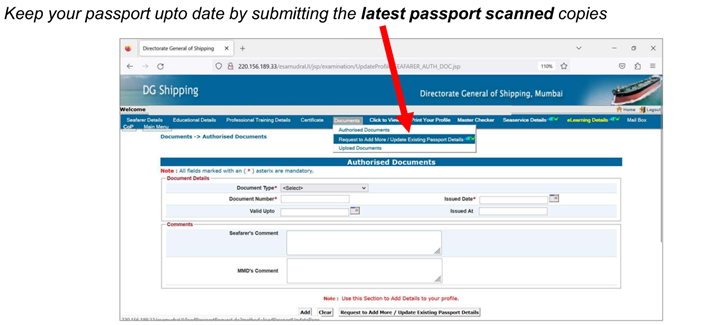
One of the most commonly missed steps is keeping your passport details current. On the Documents tab, navigate to Authorised Documents and then click on "Request to Add More / Update Existing Passport Details".
Here you can:
- Select Document Type (Passport)
- Enter your Document Number, Issued Date, Valid Upto, and Issued At
- Upload the scanned copy of your latest passport
This is critical. Your passport details in the DGS system must match what you carry on board. Mismatches during port state control or flag state inspections can cause serious problems.
Pro Tip: Every time you renew your passport, log in to your DGS profile and update the passport details right away. Make it a habit - just like updating your CDC.
Common Mistakes to Avoid
Not updating your mobile number or email ID: The DGS portal sends important communications via these. If your old number or email is registered, you may miss critical alerts or OTPs.
Letting your passport details lapse: If your passport has expired and you haven't updated the new one on the portal, it creates a mismatch that can delay CoC renewals and SID applications.
Using the wrong browser: The DGS Esamudra portal is optimised for Mozilla Firefox. Using Chrome can result in display issues or failed submissions.
Not saving each section before moving on: The portal does not auto-save. Always click Save & Next after filling each section.
A Quick Checklist for Indian Seafarers
Here is what you should verify on your DGS profile at least once every six months:
- Current mobile number and email ID are correct
- Permanent and temporary address is updated
- Latest passport details are uploaded with correct validity dates
- Physical details (height, identification mark) are accurate
- Educational and training details reflect your latest certificates
- Sea service entries are up to date
Final Thoughts
Maintaining your DGS seafarer profile is not a one-time task - it is an ongoing responsibility. Think of it as your digital official file with the Government of India. The few minutes it takes to log in and check your details can save you hours - or days - of delays at a critical career moment.
At Sea & Beyond, we work with hundreds of seafarers navigating not just career transitions but also the administrative complexities of the Indian maritime ecosystem. If you have questions about your DGS profile, INDoS registration, SID application, or any other seafarer documentation, feel free to reach out to us at support@seaandbeyond.com or drop a comment below.
Stay updated. Stay compliant. Keep sailing forward.
Have questions about your DGS profile or seafarer documentation? Connect with the Sea & Beyond team - India's leading platform for seafarer career guidance, shore jobs, and maritime courses.



Akshay Shrivastava
Akshay Shrivastav sailed as a Third Officer on oil and chemical tankers before deciding to chart a different course. An IMU Nautical Science graduate and incoming HEC Paris MBA candidate, he writes informational blogs for sailors — breaking down DGS circulars, certification processes, and career transition pathways so merchant navy officers can make well-informed decisions, whether they're sailing or planning the move ashore.
Leave a comment
View more
Give your career a boost with S&B professional services.
CV Prep/Evaluation Prep Service
 SeaCommerce
Shop maritime books & essentials
DG Medical Examiners
Find approved doctors near you
Tools & Calculators
Free maritime tools for seafarers
More Jobs
Ship management
Mumbai
Vessel Performance Analyst..
Ship management
Mumbai
Vessel Performance Enginee..
Ship management
Mumbai
Voyage Optimisation Manage..
Interview Prep/Mentoring
Find your polestar with the host of experts available on our platform
Know more

Contact Us