
How to Apply for GMDSS GOC COC in India: A Complete Step-by-Step Guide for New Applicants
 Akshay Shrivastava
21 Apr 2026
4171 view
0
0 Comment
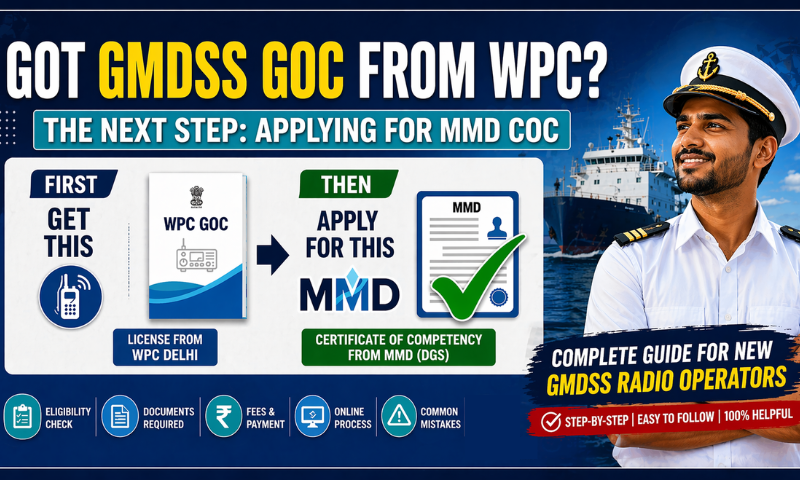
If you've recently passed your GMDSS exam and received your General Operator's Certificate (GOC) from WPC Delhi, you're halfway there. The next step — one that many new applicants overlook or delay — is applying for your GMDSS GOC Certificate of Competency (COC) from the Mercantile Marine Department (MMD) under India's Directorate General of Shipping (DGS).
Without this COC, you are not legally qualified to perform GMDSS radio watchkeeping duties on internationally voyaging SOLAS vessels, regardless of whether your WPC GOC is valid. This blog is your definitive guide to getting it right the first time.
What Exactly Is the GMDSS GOC COC?
The Global Maritime Distress and Safety System (GMDSS) is the internationally mandated communication framework for distress alerting and maritime safety communications on seagoing vessels. To operate GMDSS equipment professionally, you need two separate but equally important documents:
- GOC from WPC Delhi — the technical radio licence issued by the Ministry of Communications.
- GMDSS GOC COC from MMD — the Certificate of Competency issued under STCW standards by the Directorate General of Shipping.
The WPC GOC certifies that you can operate the equipment. The MMD COC certifies that you meet international maritime competency standards under the STCW Convention. Both are mandatory for Indian seafarers serving on vessels where GMDSS watchkeeping is required.
This blog covers the MMD COC application in full detail.
Who Is Eligible to Apply?
To apply for a fresh GMDSS GOC COC, you must:
- Hold a valid GOC issued by WPC Delhi
- Have completed at least 12 months of approved sea service within the preceding 5 years — OR hold proof of equivalent shore-based service in lieu of sea service
- Hold a valid Medical Fitness Certificate issued by a DGS-approved doctor
- Have an active INDoS number (Indian National Database of Seafarers) registered with DGS
If you have the sea service but not the WPC GOC yet, that step must be completed first. The GMDSS COC application from MMD follows after.
Two Paths to Applying — Which One Is Yours?
Path A: You Have 12 Months of Sea Service in the Preceding 5 Years
This is the standard, most straightforward route. Follow the full step-by-step process detailed below.
Path B: You Have Equivalent Shore Service (No Sea Service in Past 5 Years)
If you've been working in a shore-based role that is considered equivalent to sea service (such as a marine-related operational role), you can still apply. There is a specific workaround in the system — covered in detail later in this guide.
Step-by-Step: Online GMDSS GOC COC Application via DG Shipping
Step 1 — Open the DG Shipping E-Governance Portal
Using a Mozilla Firefox browser (recommended for compatibility), go to www.dgshipping.gov.in. Click on the "E-GOVERNANCE" tab in the top navigation bar. A dropdown will appear — click on "e-governance" and proceed.
Pro tip: Use Mozilla Firefox for the DGS portal. Some features may not work correctly on other browsers.

Step 2 — Log In with Your INDoS Number
On the login screen, enter your INDoS number and password to access the DG Shipping seafarer dashboard. Once inside, scroll to the Seafarer section and click on "GMDSS Radio Operator".

Step 3 — Navigate to the Application Page
Under "Services for Seafarer – Nautical", you will see the left-side panel listing various application types. Click on "Application for GMDSS Radio Operator". This opens the GMDSS Application form with five tabs: Personal Details → Address → Sea Service Details → Fees Details → Attach Documents.

Step 4 — Fill in Personal Details (Tab 1)
Your name, date of birth, INDoS number, CDC number, nationality, and passport number will be auto-populated from your INDoS profile. Review them carefully — the certificate will be printed with exactly this data.
You will also need to manually fill in:
- Office Applied To (select the relevant MMD office)
- Application Type — choose carefully. If you select the wrong application type and submit, the application can only be corrected by requesting a rejection via email to MMD. It cannot be reverted.
- Place and Date of Examination
- GOC Booklet Number issued by WPC Delhi
- Valid Date of GOC Booklet
- Issue date and valid date of GMDSS Endorsement/CoC issued by MMD (if applicable)
- Grade and CoC Number
- Medical Certificate Details — Name of doctor, DGS Approval Number, place of issue, and date of issue
Important: If any personal detail needs correction, use the "Request for Personal Details Correction in Seafarer Profile" link before submission. If CDC details are not visible, visit the CDC checker at www.dgshipping.gov.in.

Step 5 — Fill in Address Details (Tab 2)
Enter your complete postal address: house number, street, village/post office, district, state, and pin code. Also provide your email address and mobile number.
Your certificate will be dispatched by Speed Post only to this address. Hand delivery is not accepted. A wrong address means a lost certificate — take your time here.

Step 6 — Fill in Sea Service Details (Tab 3)
This is arguably the most consequential tab. For each vessel you've served on (that qualifies toward the 12-month requirement), enter:
- Name of Vessel
- Port of Registry
- Vessel Type
- Rank Served
- From Date and To Date
- IMO Number / Official Number
- Remarks (optional, unless using dummy entry — see below)
Click "Click to add Sea Service Details" after each entry to save it.
The system will display a note: "Minimum one year of sea services required in the last 5 Years i.e. '01-JUL-2018' onwards."
Critical warning: Sea service details cannot be edited once the application is submitted. Double-check vessel names, dates, and ranks before proceeding.

Special Case — Applying with Equivalent Shore Service
If you do not have 12 months of sea service but have equivalent shore-based service, the system still requires a sea service entry to proceed further. Here is what to do:
- Enter dummy sea service details (with a duration of more than one year)
- In the Remarks column, clearly write: "Dummy sea service"
- In the document upload section (Tab 5), upload your equivalent shore service letter in place of the regular sea service letter
This workaround is officially recognised and documented in the DGS application guidelines.
Step 7 — Review Fees Details (Tab 4)
The application fee is ₹3,000, payable via ePayment (net banking, debit/credit card). The fees page will confirm the amount before you continue.
Note: Online payment is made only after the application number is generated — not at this stage. Proceed to Tab 5 first.

Step 8 — Attach Documents and Generate Application Number (Tab 5)
This is the final tab before submission. The system lists 7 documents to be kept ready for upload:
| Sr. No. | Document |
|---|---|
| 1 | Scanned copy of the signed online application |
| 2 | Passport-size photograph (3.5 cm × 3.5 cm, white background, face covering 70%) |
| 3 | Scanned signature of the seafarer |
| 4 | Record of approved sea service — original letter from Vessel Owner/Agent, with RPSL No. & email address |
| 5 | Scan copy of Indian COC (GMDSS) certificate with renewal pages |
| 6 | Self-attested scan copy of Medical Fitness Certificate from DGS-approved doctor |
| 7 | Self-attested scanned copy of CDC booklet pages showing relevant sea service |
Read the Declaration at the bottom carefully. Tick the "I agree" checkbox and click "Generate Application No."
Once you click Generate Application No., the application is submitted and data cannot be modified. Make sure everything is correct.

Step 9 — Pay the Application Fee Online
After the application number is generated, the status screen will show "Payment Status: Not Paid" with a "Pay Now" link. Click it and complete the ₹3,000 payment.
Payment can also be made through the "Pay CoC & CoP Fees, Upload Documents and View Status" link on the main services page.
Key reminders:
- Fees once paid will not be refunded under any circumstances.
- Do not make multiple payments. If your amount is debited but not reflected, wait 3 working days. Then write to egovernance-dgs@nic.in with your Application No., Transaction ID, date of payment, and amount.


Step 10 — Upload Documents and Track Your Application
After payment, return to "Pay CoC & CoP Fees, Upload Documents and View Status" link. Click "Upload Docs" next to your application and upload all seven documents.
Once uploaded, the Remarks column will update progressively. Monitor it regularly:
- Initial status: Application submitted
- After MMD review: Approved
- Once dispatched: Speed Post tracking number appears in Remarks
If MMD raises a query (e.g., unclear document), respond by re-uploading the corrected document through the Upload Docs tab.

Common Mistakes to Avoid
- Wrong Application Type — This cannot be corrected post-submission without rejection.
- Incorrect address — Certificates are Speed Posted; a wrong address means non-delivery.
- Sea service date errors — Once submitted, these cannot be changed.
- Multiple fee payments — The system may process multiple transactions; refunds take time.
- Low-quality document scans — Blurry or illegible documents will result in queries and delays.
- Not printing and signing the application — Document 1 on the list requires the printed application to be signed before scanning.
Fees Summary
| Item | Amount |
|---|---|
| GMDSS GOC COC Application | ₹3,000 |
| Payment Mode | ePayment only |
| Refundable? | No |
Frequently Asked Questions for New Applicants
Q. Do I need a seat booking confirmation to apply for COC?
Yes. Only candidates who have completed seat booking online can apply for the COC online. If you appeared for the exam through a different route, check the FAQ section on the DGS portal.
Q. My CDC details are not visible on the portal. What do I do?
Visit www.dgshipping.gov.in and use the CDC checker tool. Follow the instructions to verify or update your CDC details.
Q. Can I apply for GMDSS COC if I'm currently sailing?
Yes. You can initiate and complete the application online before signing off or during your leave. Just ensure your documents are current.
Q. How long does it take to receive the certificate?
Processing time varies by MMD office. After approval, the certificate is dispatched by Speed Post and a tracking number will appear in the application status page.
Q. What if my GOC booklet from WPC has expired? Can I still apply?
Your WPC GOC should ideally be valid at the time of application. Check with your MMD office regarding specific guidance if your WPC booklet validity is a concern.
What's Next After Your GMDSS COC?
Getting your GMDSS COC is a significant professional milestone. It opens the door to roles requiring certified GMDSS competency — both at sea and increasingly in shore-based roles involving maritime communications and safety management.
If you're thinking about what comes next in your maritime career — whether that means advancing your qualifications, exploring shore-based roles, or planning a structured transition from sea to shore — Sea & Beyond is built for exactly that.
We help Indian seafarers access:
- Shore job opportunities across India, Dubai, and global shipping hubs
- Maritime courses and COC programmes to advance your qualifications
- Career mentoring from senior maritime professionals who've made the transition themselves
Explore maritime career opportunities and courses for seafarers at Sea & Beyond.



Akshay Shrivastava
Akshay Shrivastav sailed as a Third Officer on oil and chemical tankers before deciding to chart a different course. An IMU Nautical Science graduate and incoming HEC Paris MBA candidate, he writes informational blogs for sailors — breaking down DGS circulars, certification processes, and career transition pathways so merchant navy officers can make well-informed decisions, whether they're sailing or planning the move ashore.
Leave a comment
View more
Give your career a boost with S&B professional services.
CV Prep/Evaluation Prep Service
 SeaCommerce
Shop maritime books & essentials
DG Medical Examiners
Find approved doctors near you
Tools & Calculators
Free maritime tools for seafarers
More Jobs
Ship management
Dubai
Engineer Surveyor – Marine
Ship management
Chennai
Buyer – Marine Procurement
Ship management
Dubai
Procurement Executive
Interview Prep/Mentoring
Find your polestar with the host of experts available on our platform
Know more